Instagram
Showing posts with label Android. Show all posts

11 August 2016

Pokemon Go - Update 0.33.0 (Android) / 1.3.0 (iOS)

Pokemon Go has been facing a huge amount of negative reviews, it's ratings have gone down from 5 starts to 2 stars. The developers at Niantic have been working day and night to fix all the bugs and errors and return Pokemon Go to it's former glory. 

Here's what all they've introduced and fixed in the latest update ( version 0.33.0 for Android and 1.3.0 for iOS). They have:  

  • Added a dialog to remind Trainers that they should not play while traveling above a certain speed. Trainers must confirm they are not driving in order to continue playing.
  • Made improvements to the accuracy of a curveball throw
  • Fixed a bug that prevented ”Nice,” ”Great,” and “Excellent” Poké Ball throws from awarding the appropriate XP bonuses.
  • Fixed achievements showing incorrect Medal icons.
  • Enabled the ability for Trainers to change their nickname one time. Please choose your new nickname wisely.
  • Resolved issues with the battery saver mode on iOS and re-enabled the feature.
  • Added visuals of Team Leaders Candela, Blanche, and Spark.
  • We’re currently testing a variation of the “Nearby Pokémon” feature with a subset of users. During this period you may see some variation in the nearby Pokémon UI.
  • Minor text fixes.

18 May 2015

Switching To a Windows Phone

As you all know I've been in love with android since '09. I switched to iOS once but the openness of Android pulled me back. The love for Google Services was what actually pulled me back. I was using almost everything GOOGLE !

I have had a lot of android devices and I even got a companion for my daily driver. The new thing in the android world was Android Wear so I ordered a LG G Watch as it was being sold for approximately $100.

My experience with Android Wear was great, I received a few updates on my watch and Android Wear 5.0 was fabulous. I had a huge collection of watch faces and some classic games on my wrist. I could even match the color of my watch with the color of my dress. I was in love with it, Android Wear became an essential part of my life
BUT!! ... .

Windows Phone, I've never thought of it until a few days back. I've been all over YouTube, searching for everything related to Windows Phone. I even went through the detailed Build Videos posted by Windows. I was in Virtual Love with Windows Phone. I had urges running through me, I was being compelled to purchase a Windows Phone because no matter how much I loved Android, it was like the girlfriend who you love a lot but there are a few things that she does which you hate and would eventually lead to a BREAK UP!!

It was time for a CHANGE. I was going to keep my Android device as a second phone because you can't go ahead and break up suddenly with someone you've been in love with for years. So I guess I was going to date Windows phone behind Android's back, is this called CHEATING?

So I started searching for a nice affordable Windows device, I didn't want anything too damn powerful and I didn't want to spend a lot of money because I don't know if this new relationship would keep me happy in the long run.
 

I searched a lot and I found the right girl/smartphone for me and it was the Microsoft Lumia 640 and I ordered the Cyan color because it was like 'Love at first sight'. My device is incoming and I'll post updates about the new journey I'm about to start soon ... So stay tuned.

You can check out the Microsoft Lumia 640 below:
Lumia 640

Buy the Lumia 640:
From Flipkart

2 March 2015

Lenovo Launches 2 new smartphones at MWC15

Lenovo announced 2 new tablets and now they have announced 2 super sexy and different devices. Oh yeah they are different and one of them has killer looks. So the two recently announced devices are Lenovo VIBE shot and Lenovo A7000.

The Lenovo VIBE shot is a phone which focuses on the camera. It is for those who want an all in one device, for those who rely solely on their smartphones. It offers a 16MP shooter with 6-piece lens, Optical Image Stabilization, a 16:9 low light BSI sensor and lots more. It has a 5Inch FullHD display and runs Android 5.0 Lollipop out of the box.

Whereas the Lenovo A7000 is a device with 5.5 inch display, a 64-bit processor, runs Android 5.0 Lollipop out of the box oh and has the Dolby ATMOS Surround Sound enhancement which should make this device a great entertainment machine.

Here are the specifications, pricing and availability.

Lenovo VIBE Shot:


This looks so good. Damn I wish I could get one. I'm the type who won't carry a camera along so I guess this is the device for me. But anyways here are the specs:
  •  Display: 5 Inch IPS LCD with 1920x1080 resolution and Gorilla Glass 3.
  • Processor: 1.7GHz octa-core 64-bit Qualcomm Snapdragon 615
  • GPU: Adreno 405
  • 3GB RAM
  • Storage: 32GB of internal storage and MicroSD expansion up to 128GB (Oh boy I want this device) 
  • Cameras: Front: 8MP fixed focus
                   Rear: 16MP auto-focus with tricolor flash, OSI, pro shooting mode, 16:9 BSI sensor etc
  • Battery: Non-removable 2900mAh 
  • 142x70.4x7.3mm, 145g
  • Dual Nano SIM, 4G LTE support etc
  • Android 5.0 Lollipop with Lenovo's custom software
  • Colors: White, Red or Grey
  • Availability: June 2015
  • Price: $379
I can't say anything about this device, I think this is the perfect smartphone for me. Now it's time for the Lenovo A7000

Lenovo A700:


This is the first smartphone to feature the Dolby ATMOS Surround Sound enhancement and has a 5.5 inch display so this should be a good device for media consumption. It's a mid range device and I guess won't disappoint.
  • Display: 5.5Inch IPS LCD with 1280x720 resolution
  • Processor: 1.5GHz MediaTek MT6752m True8core
  • GPU: ARM Mali 760 MP2
  • 2GB RAM
  • Storage: 8GB of internal storage with MicroSD expansion up to 32GB
  • Cameras: Front: 5MP fixed-focus
                    Rear: 8MP auto-focus
  • Battery:  Removable 2900mAh 
  • 152.6x76.2x7.9mm, 140g
  • Android 5.0 Lollipop with Lenovo Vibe UI
  • Dual MicroSIM slots, 4G LTE compatible
  • Colors: Onyx Black and Pearl White
  • Availability: March 2015
  • Price: $169
This device looks promising given the low price tag. I believe this is why Lenovo became the 3rd largest manufacturer.


So what are your thoughts about the 2 devices? Are you impressed by Lenovo? Leave your thoughts down below in the comment section. Feel free to hit the +1 button and share the post. Thanks
Enjoy!

Lenovo Announces 2 New Tablets at MWC 2015

There are a lot of new devices available now, thanks to MWC 2015. Every manufacturer is up with something and we've seen some pretty amazing launches till now but MWC hasn't ended yet and Lenovo isn't behind.

Lenovo announced 2 new tablets at the MWC. The 2 new tablets are Lenovo Tab2 A8 and Tab 2 A10.
So here are some details about the Tab 2 A8.

Lenovo Tab 2 A8:


The Lenovo Tab 2 A8 is cheaper than the 2nd offering by Lenovo i.e. the A1. It features Dolby ATMOS Surround Sound enhancements which is said to improve the media consumption experience on these tablets. It is a 8-inch tablet and offers Android 5.0 Lollipop out of the box. It will come in 2 variants i.e. a WiFi model and LTE enabled model.
  • 8 inch IPS LCD display with 1280x800
  • WiFi model: 1.3GHz quad core MediaTek MT8161 processor
    LTE model: 1.3GHz quad core MediaTek MT8735 processor
  • 1GB RAM
  • Storage: 8GB (Ebony model only), 16GB(Midnight Blue, Pearl White & Neon Pink) with microSD up to 32GB
  • Cameras: Front: 2MP
                    Rear: 5MP
  • Non-removable 4200mAh battery
  • Android 5.0 Lollipop
  • 125x210x8.9mm, 360g
  • Availability: June
  • Price: WiFi starting at $129 and LTE starting at $179

Lenovo Tab  2 A10:


The Lenovo Tab 2 A10 is a better performer than A8 but has Android 4.4 KitKat and will receive the Android 5.0 Lollipop update will hit the devices in June. The A10 has WiFi and a LTE enabled model. It offers Dolby ATMOS surround sound enhancement and a 10.1 inch full HD screen which should make up for a great media consumption experience.

  • 10.1-inch Full HD IPS LCD display with 1920x1200 resolution 
  • WiFi model: 1.5GHz quad core 64bit MediaTek MT8165 processor
    LTE model: 1.5GHZquad core 64bit MediaTek MT8732 processor
  • 2GB RAM
  • 16GB internal storage with MicroSD expansion up to 32GB
  • Cameras: Front: 5MP
                   Rear: 8MP
  • Non-removable 7200mAh battery
  • Android 4.4 KitKat (Lollipop update coming in June)
  • 171x247x8.9mm, 509g
  • Colors: Pearl White and Midnight Blue
  • Availability: April
  • Price: WiFi starting at $199 and LTE starting at $279

So what are your thoughts on Lenovo's latest tablet offering? Leave your thoughts below in the comment section. Feel free to hit the +1 button or share the post. Thanks
Enjoy! 

Source: Android Authority

Sony announces 64bit Xperia M4 Aqua at MWC 2015

Sony announced the Xperia Z4 tablet and now it's time for a smartphone and here's one. Sony launched an all new waterproof, 64bit mid range Xperia device i.e. the Xperia M4 Aqua. It includes a 64 bit Snapdragon 615 SoC which is a quad-core processor with 4 cortex A53 cores out of which 2 are clocked at 1.7GHz and the other 2 at 1.0GHz.

This waterproof camera phone comes in a range of stunning colours

Sony Xperia M4 Aqua: 

  • Processor: Snapdragon 615 64-bit (2 1.7Ghz Cortex A53 cores and 2 1.0GHz Cortex A53 cores)
  • GPU: Adreno 405
  • Display: 5.0 Inch 720p 
  • Cameras: Front: 5MP
                   Rear: 13MP
  • RAM: 2GB
  • Storage: 8GB/16GB internal with MicroSD card expansion up to 32GB
  • Android 5.0 Lollipop
  • Battery: 2,400mAh
  • Colors: Black, White, Pink 

 The Xperia M4 Aqua has a gorgeous 5” HD display

The device comes with IP65 certification which is good (for waterproofing) and IP68 dust protection. However the 720p 5Inch display is adequate but in the age of Full HD and Quad HD it may be a problem for some. The anticipated pricing is 299 euros but Sony is not announcing the availability and price as of now.

 The Xperia M4 Aqua is a waterproof and dust tight camera phone

The Xperia M4 Aqua looks like a promising device and I guess it could pull Sony out of it's problems but only time will tell. So what are your thoughts about the Xperia M4 Aqua? Is the 720p display a problem for you? Leave your thoughts in the comment section below. Feel free to hit the +1 button or share the post. Thanks
Enjoy!
   

Sony announces the Xperia Z4 Tablet at MWC 2015

MWC 15 hasn't ended yet and here we are with another new device.


There will be no Sony Xperia flagship smartphone but instead Sony has the Xperia Z4 tablet. Sony announced the tablet today at the MWC 2015. The new Xperia tablet i.e. the Z4 tablet is a bigger, thinner, lighter, and a much more powerful tablet as compared to the previous generation.

In terms of design the Z4 tablet looks a lot similar to the last generation Xperia Z3 Tablet compact. It has rounded edges which will be great with the 10.1inch QuadHD display (yeah its a QuadHD display now, its a welcome change). It is 6.1 millimeters thin and weighs just 389 grams. It is water and dust resistant with a dual IP65 and IP68 rating.

The Xperia Z4 tablet is the 1st tablet to feature a Qualcomm Snapdragon 810 processor (it has 4 fast and 4 power saving cores) and an Adreno 430 GPU. There's 3 GB of RAM, 16GB or 32GB of internal storage and microSD support. The main camera has been switched to 8MP instead of 13MP on the previous generation tablets. Battery?? Hell yeah.. It consists of a 6,000 mAh unit so the battery life should be great but since the device has a QuadHD display so the battery life may be affected a bit.


Looks like Sony has lost faith in its mobile business and it looks like this tablet is their last hope. Would you still consider buying the Sony Xperia Z4 tablet? What are your thoughts about the tablet? Leave your thoughts down below in the comment section. Feel free to +1 or share this post. Thanks.

Enjoy!!

1 March 2015

Samsung Galaxy S6 and S6 Edge launched at MWC 2015

MWC 2015  is really exciting, we've seen a lot of great launches that include the Huawei Smartwatch, the HTC One M9 and finally now its time for Samsung to make the big announcement and here it is, the Galaxy S6 and S6 Edge.

Samsung Galaxy S6: 

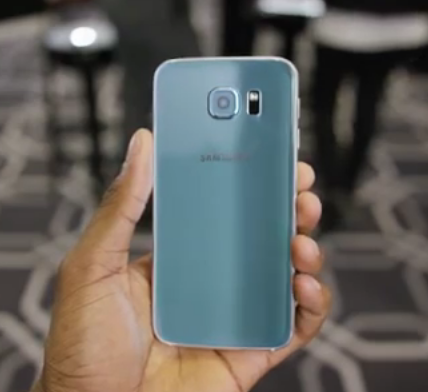
The S6 follows a totally different design language and it's impressive, the all glass design looks good.


Processor: Exynos Octa Core 2.1GHz chipset.
RAM: 3GB LPDDR3
Display: 5.1 Inch Super AMOLED with QuadHD resolution (577ppi)
Battery: 2550mAh
Storage: 32GB,64GB or 128GB (fixed, based on Universal Flash Storage 2.0) [no sd card expansion]
Cameras: Front: 5MP
               Rear: 16MP with Optical Image Stabilization
It has a fingerprint sensor, LTE Cat 6 support, TDD and FDD bands, Bluetooth 4.1
Android Version: 5.0 Lollipop with Samsung's lighter than before TouchWiz


The S6 is top notch and these specifications are beastly.

Samsung Galaxy S6 Edge:

The S6 Edge is different than the Note Edge, the S6 edge has a dual side edge i.e has the edge on both the sides of the screen, this feels a lot better than one sided edge on the Note Edge.
As far as the specifications go the S6 edge is a little bit more beastly as compared to the S6.


Processor: Exynos Octa Core 2.5GHz chipset
RAM: 3GB LPDDR3
Display: 5.1 inch Super AMOLED with QuadHD resolution (577ppi)
Battery: 2600mAh
Storage: 32GB, 64GB or 128GB (fixed storage, based on UFS 2.0 and no MicroSD card expansion)
Camera: Front:5MP
              Rear: 16MP with Optical Image Stabilization

It is pretty much similar to the S6 and both these devices support Wireless charging.

So what do you think? Do you like the new design language or the fixed storage options? Which device would you prefer the S6, S6 Edge or the HTC One M9? Leave a comment in the comment section down below. Hit the +1 button and share the post if you liked it. Thanks
Enjoy!!

source: MKBHD for the images :) 


HTC One M9 Launched at MWC 2015

There were a lot of leaks regarding the HTC M9 and a lot of conspiracy theories regarding the looks of the device.. But here we go HTC launched the M9 and oh boy!! it does look a lot like last year's M8. There are a few changes like the power button placement and a few lines etc. It still rocks a 5-inch 1080p LCD touchscreen but the internals aren't the same anymore.

Specifications:

Processor: Snapdragon 810Octa-Core (Quad Core 1.5Ghz Cortex A53 & Quad Core 2GHz Cortex A57)
RAM: 3GB 
Display: 5-inch Full HD (441ppi)
Storage: 32GB (expandable with MicroSD cards up to 128GB) 
Battery: 2840mAh
Cameras: Front: 4MP Ultrapixel
               Rear: 20.7MP
Android Version: 5.0 Lollipop with HTC Sense skin (reduces the out of box storage to 21GB)
Colors: Gunmetal Gray, Silver, Amber Gold, Rose Pink.


The HTC One M9 has the same awesome front firing speakers but with Dolby audio tuning this time.
One thing that was wrong with the M8 was the 4MP ultra-pixel shooter, it was great for low light imaging but sacrificed the resolution. The M9 however has moved on and has a new 20MP camera that ditches the depth sensing lens (thank god!!). The front camera however uses the same 4MP ultra-pixel technology to improve low light shots for night-time selfies.

So what are your thoughts on the M9 leave them below in the comment section. Fell free to +1 and share the post. Thanks
Enjoy!!

Acer announces 3 new smartphones


Acer launched 2 budget devices and 1 mid tier device today, the Liquid Z220, Z520 and Jade Z respectively.
So let's talk about them a little.

Acer Liquid Z220: 

Processor: 1.2Ghz Dual Core Snapdragon 200
RAM: 1GB
Display: 4Inch WVGA 233PPI
Storage: 8GB internal storage
SIM: Dual Sim
Cameras: Front: 2MP
               Rear: 5MP (89Degree Wide View Snapper)
Android Version: 5.0 Lollipop with Acer's customized software
Price: €89
Availability: March 2015

Acer Liquid Z520:

Processor: 1.2 Ghz Quad Core Snapdragon 400
RAM: 1GB
Display: 5inch WVGA (186ppi)
Storage: 8GB internal storage
SIM: Dual Sim
Cameras: Front: 2MP
               Rear: 8MP
Android Version: 5.0 Lollipop with Acer's customized software

The Liquid Z520 also offers DTS Studio Sound speakers.
Price: €109
Availability: April 2015

Acer Liquid Jade Z: 

Processor: 64-bit Quad-Core MediaTek SoC, either MT6732 or the newer MT6735
Display: 5inch Full HD display with new Zero Air Gap technology
Cameras: Front: 5MP f2.2 aperture
               Rear: 13MP f1.8 aperture
Android Version: 5.0 Lollipop with Acer's customized software

The Jade Z also offers Cat4 LTE data speed support.
Price: €199
Availability: March 2015

Please feel free to hit the +1 button and share the article. If you have any questions leave them in the comment section below. Thanks
Enjoy!!

22 February 2015

Everyone who has been using Google Now could jump into the Phone Settings to turn ON/OFF WiFi, Bluetooth, GPS etc. But there was no way to do it with just your voice - using a voice command would take you to the correct settings but you had to tap to turn it ON/OFF or sometimes it would end up searching the web. I hated that and stopped using Google Now for toggling settings ON/OFF.

Good News !! If you are running the latest version of android i.e. Lollipop and the latest version of the Search app then the above mentioned problem is GONE and you can toggle settings with your voice. 

This was first discovered by Android Police, the feature works with the built-in flashlight, WiFi and Bluetooth. Other features like GPS, Airplane Mode, volume or tethering don't seem to work in our testing. For the 3 features that work you get a confirmation and a card that let's you toggle the feature back ON/OFF with a tap along with some details. For eg; the Bluetooth card shows you the list of Bluetooth devices and the WiFi card shows you the WiFi networks that are available.


This feature is currently supported only on devices running Lollipop, I don't know why Google is taking so long to roll out such basic functionality to Google Now, given that it allows users to take pictures, play songs from Play Music or YouTube etc with their voice.  

Let's see how long Google takes to roll out this feature to devices running older versions of android. Are you able to use this feature on a device running an older version of android? Leave a comment below in the comment section. If you found this post useful or think this would help someone you know please fell free to share or +1 this post.

Enjoy!

11 December 2014

Ghostery : The Browser That You Need !

Have you all been wondering who's watching you while you browse or are you tired of all the ads and pop up messages that arrive when you browse the web.
Well then the solution to your problem is Ghostery.
Ghostery is a browser application that is available in the Play Store and is currently free of cost. It is a great browser and I've been using it for over a week now. It shows you the trackers that a website loads when you are browsing and it allows you to start/pause the blocking whenever needed. The list of trackers shown is accurate and it offers full control over your browsing experience. It allows you to browse without any tension and you feel free and safe.

The UI is pretty simple and minimalistic, its a combination of blue and white. The interface is similar to any other browser out there. There is an area for your link, icon for creating new tabs, a small blue ghost ( will get back to it later ) and 3 vertical dots for various settings such as viewing history, bookmarks, requesting desktop sites etc.


The settings area has 3 sections, GHOSTERY section allows you to toggle ON/OFF auto-update tracker library, block new trackers and various tacker blocking options. The GENERAL settings section allows you to choose the search engine, clear history etc and last the ABOUT section shows you the version, number of trackers etc.

     
Now lets talk about the small Blue colored GHOST. This blue ghost shows you the trackers that a website is trying to load and allows you to manually allow any tracker if you want. It even allows you to pause blocking and even add a website to the Whitelist. So the center of attraction here is the small blue ghost, this small ghost is everywhere it's even the icon of the browser. It looks cool and performs well..  So good job GHOST !!  You can download the Ad Control app for further control and details.
 
 
So GHOSTERY browser is a must have app, you should download it and start using it if you need to see whose tracking you and it's automatic even a non-tech guy can stay safe and can block ads easily.

 Here's the download link for GHOSTERY :
GHOSTERY on Play Store.

GHOSTERY Ad Control on Play Store

If you have any suggestions, questions or comments then please leave them in the comment section below.
If you liked my article please feel free to +1, share and spread the word.
Enjoy !! 

7 December 2014

Moto G 1st Gen (India) Receiving Lollipop

The 1st Gen Moto G -  Dual Sim has started receiving the Lollipop OTA,  users have been reporting about the OTA. 
The report came from screenshots posted by an XDA user whose using the Indian Dual Sim Moto G 1st Gen.

The update is coming out in phases,  so you may not be able to update it right now. But it's here and it's only a matter of few days and all of you can have Lollipop. 
To check for the update:
Go to Settings - > About Phone - > Check for Updates

And if you have the update pending you'll get a notification.  So go ahead and press the check now button.

So have you received the OTA or are you still waiting?? 
Leave a comment below in the comment section. 
Plz feel free to share, +1 and
ENJOY!!

5 December 2014

OnePlus One will be supported by CM in India!

Rumors were floating around that the OnePlus One would be launched with CM in India but would not be getting any further updates..
This rumor came to life because of Micromax announcing Cyanogenmod's exclusivity to itself.
The OnePlus One is a great device, it has pretty solid specs and it has CM out of the Box.  But after these rumors, that charm that OnePlus One had kind of faded.

But Cyanogen came out of the dark and said :
We are proud of the work we did on the OnePlus One. Through our collaboration with OnePlus, we demonstrated the power of strong hardware and software tuned for exceptional performance. To clarify misinformation out there, the OnePlus One will get OTA firmware updates for all global devices, including global devices for our users in India. Rather than have misinformation continue to circulate out there, we felt it important to bring this matter to rest.

So this announcement puts all those rumors to rest and now OnePlus One does seem like the go to device.  It has everything one looks for a smartphone at that price...

So will you consider buying the OnePlus One now?  Would you switch to the OnePlus custom OS when it comes or will you stick to CM??

Feel free to share, +1 and

Enjoy!! 

4 December 2014

Have you all been craving for the taste of Lollipop ? Are you bored of KitKat ? If yes, then you are at the right place. You'll find a lot about Lollipop right here right now...
Well I was waiting for Lollipop eagerly, I didn't have a Nexus 5 or Nexus 7 2013 so I couldn't get my hands on the Developer Preview but I have a Nexus 7 2012 and the wait was killing me. But luckily Google uploaded the Factory Images for the Nexus lineup and that included the Nexus 7 WiFi 2012. I was excited, I was willing to loose all my data, I couldn't wait anymore and my Nexus 7 was too damn sluggish, So I downloaded the factory image and I flashed it....

Flashing Lollipop on my Nexus 7 2012 Wifi
The flashing process took 169.971 seconds and then came the message "REBOOTING"
The screen of my Nexus 7 flashed and I was damn excited. The boot animation started and it continued for 10 minutes, I got scared for a moment and I though I might have screwed up the flashing process. But as I was having this thought in my mind the screen flashed again and the welcome screen appeared and I was relieved. 

The Welcome Screen.. It's so colorful :) 
The setup process was a lot different, it was much more colorful and lively. The colors popped up and it had the much needed change, android felt alive for the first time...


Love the background 
The Tap & Go feature makes it easier to migrate

Almost ready !
The owner info screen !
I was introduced to the keyboard with light material design (the official build) and all I can say about it is that it's minimal and has the much needed change, the Holo themed google keyboard looked boring and dull when compared to the material themed keyboard. I also loved the way the back navigation buttons would change the direction when the keyboard would pop up.


Take a look at the way the back navigation button has changed its direction.. 

 The setup process took approximately 2 minutes and I reached my heaven, Lollipop was ready and I jumped right in. The homescreen looked beautiful, it was simple, plain, minimal and had a analog clock widget. I know some of you don't like the new navigation buttons but I guess it's personal preference, I like it and I guess those navigation buttons needed change and change is welcome.


Homescreen
One thing that I noticed is that when I opened the app drawer the background was black and looked a lot like the app drawer in kitkat. Even the folders had a black background. I wanted the white app drawer and the animations.


So I downloaded the Google Now Launcher and I finally had the white background and I was happy. The icons looked beautiful and they felt real..
Here's what the homescreen looked after applying the Google Now Launcher:
 

The animations looked great and felt great. A simple tap on the app drawer would allow the white ball to increase it's radius and finally turn into the apps section that you see above. It looked like a PokeBall and I literally tapped it again and again just to see the animations.
Now a simple swipe down from the top of the screen would bring the notifications, and another swipe down would bring the quick toggles. This time you have only a main notification menu, you don't have 2 different sections (left=notifications & right=quick toggles) like you had in KitKat.


A single swipe down brings the notifications
The quick toggles
The quick toggles include options such as WiFi, Bluetooth, Airplane mode, auto rotation, location and cast screen. The brightness changing bar is directly available and when u tap it to change the brightness, the other toggles disappear and you can see the change that you will bring by tweaking the brightness, it's similar to iOS and it's great. You further have options to switch between users, you can select a Guest Mode if you are handing your device over to someone and they won't be able to access your profile and data without your password. The battery percentage, shortcut to jump to the main settings are available right beside the user selection screen.

You can change and even add users !
Tapping the volume rockers up/down brings up the ringer volume control and options to snooze your notifications, you are greeted with 3 options : None, Priority and All.
Knows as Interruptions...
These options act as a filter for your notifications, as the name suggests ALL allows all your notifications to show up, Priority allows only important notifications such as alarms and all to come through and you can choose the duration for which you want the priority mode to work and None allows no notifications at all. So that's that and now let's head to the 

Settings menu.... 

The settings menu is categorized into:
1) Wireless & Networks 
2) Device
3) Personal 
4) System 


1) Wireless &  networks: 

includes WiFi settings,  Bluetooth,  Data usage and more such as aeroplane mode, NFC, Android beam and VPN settings.  
You have a switch to turn On/Off wifi, Bluetooth,  aeroplane mode,  not etc.  
When you have your Bluetooth turned On you will notice that you are granted with a message that says " Nexus 7 is visible to nearby devices while Bluetooth Setting is open".  Now this is interesting,  you no longer need to worry about the visibility of you device.  You have options for Trusted Devices.  Trusted Devices is really interesting,  it allows your device to bypass the lock i.e.  It allows your device to stay unlocked whenever you are connected to a Bluetooth device that you have added to the trusted list,  eg: your car Bluetooth, headphones,  speakers etc. 
*This is very handy,  I use it all the time.  TRUSTED DEVICES is a great feature! *

Moving on to 

2) DEVICE :

you have options such as Home,  display, sounds and notifications,  storage,  battery,  apps and users. 
Home allows you to choose different launchers (I'm using the Google now Launcher).  
The Display section has options such as brightness level,  adaptive brightness (previously known as Auto brightness) , wallpapers,  daydream,  font size,  orientations and finally cast screen which allows you to cast your display to a TV or a screen..  
What I like in the display section is that when you tap on the brightness level option, a bar floats on the top of the screen and you can change the brightness level by moving the pointer over the meter and you can notice the change in the brightness level.  This allows you to see what actual change in brightness you are about to bring when you set the brightness at that level (this is handy and feely a little bit iOS styled)..

Sounds and notification gives you options such as media volume, alarm volume,  notification volume,  notification ringtone,  other sounds and Interruptions.
This Interruptions option is another new feature,  it allows you to choose what happens when a notification arrives,  it allows you to choose options such as always interrupt, allow only priority interruptions and the last option to stop all the notifications and that's Don't interrupt.  You can further set what you think should be considered as a priority and you should be interrupted whenever that type of notification arrives (super handy for my college life). This section even allows you to decide which notifications should be shown on the lock screen when the device is locked.

Storage, well it's exactly similar to the way it was earlier but it has a new lighter color to it and it shows the storage usage of each user.

The Battery section is interesting, the graph is based on real time usage and projects the time remaining before the device shuts down. Plus whenever you plug in the device, you can see the estimated time remaining for the charge to complete (This is great, helps me set an alarm to unplug my device).


You have a new power saving mode, which reduces your performance, stops the animations and transition effects and turn the notification bar and the bottom to ORANGE color to show that the device is running on POWER SAVING mode. I did notice considerable difference when I had the power saving mode on.


Rest everything is similar to an older android version.

The Apps section has 3 tabs, Downloaded, Running and All. The Downloaded tab shows you the apps you have have downloaded and installed onto your device, the space they use etc. The All tab shows all the apps and processes that you have on your devices, including the bloat (if any). The Running tab has a little bit of change to it, it now not only shows you the apps and processes that are running but it also shows you how much RAM is being used by the system processes, apps and how much RAM is free. This is in my view way better than the bar at the bottom that was available on older android versions.


The Users section allows you to switch between user profiles or add users to the device.


Creating profiles is a great way to keep your personal settings, apps and data safe from another user.

3) Personal: 

This section in the setting menu, basically deals with locations access, security, the accounts connected to the device, language & input methods, options to backup or reset the device.
Most of the stuff is similar to that on KitKat but what's new here, is something in Security.

Smart Lock is something that interests me, it's basically just the same old Face Unlock but with tons of improvements. Face unlock was mostly a hit or a miss but Smart lock is way better, the facial recognition has improved a lot, it's faster and more accurate. Smart lock works in the background, suppose you have some notifications on your lockscreen and you are viewing them, smart lock recognizes your face and unlocks the device while you are viewing the screen and as soon as you tap the notification or try to unlock your device, you are taken to the app or the homescreen respectively.
So smart lock is like bio-metric scanning for android, it's good to show off, iOS uses fingerprint scanning, android uses bio-metric to unlock your device... It's fun and adds an additional layer of security to your device.

4) System: 

 This section consists of  Data & Time, accessibility, printing and last but not the least, the about tablet section. We have a new Easter egg, it's not the desert case this time, it's a flappy bird styled game and it's really tough..


This section has nothing new, it's just as it was with the earlier android version,


Overall Experience: 

I've been using Lollipop on my Nexus 7 2012 for quite some time now. I have to say it's mixed. It's not the best nor the worst, it's like middle ground.
Lollipop itself is great, it has a ton of new features like interrupts, smart-lock, users, trusted bluetooth devices etc but that's it, rest almost everything is the same. It's full of material design and animations, it feels like Lollipop is basically meant a visual change just for change's sake. In one word lollipop is animations and if your device is powerful enough to handle those animations then you'll love lollipop. But if you have a device that is about 2 years old and doesn't have the best hardware then you'll be having views similar to that of mine.

As you all know the Nexus 7 2012 is famous for it's lag and sluggishness. On KitKat 4.4.4 my device had slowed down, it was so slow that I kept it on the table and wouldn't use it. Opening apps took a lot of time, multitasking was a disaster. My device was almost dead but lollipop gave it a new life.

After flashing Lollipop, the flashing process took only 4-5 minutes but the 1st boot took approximately 15 minutes. But when the device booted and the setup process began, the scrolling, opening up of the keyboard and the typing was fine, it was smooth. Then the homescreen took a minute to load and the device was stable, scrolling was smooth, rotation worked fine, the apps worked fine, everything was fine. But soon the device started struggling, it couldn't handle the animations lollipop threw at it. Apps started crashing, the device restarted itself, it would hang while playing videos, opening apps was delayed by 4-5 seconds and it felt slow and sluggish.

But sometimes the device would work just fine, it would scroll through apps, settings etc easily. Apps would run fine, multitasking was possible and the device worked perfectly. It was as if somebody threw some magic dust on my device and it started working fine. Oh and yeah I forgot to mention I love the way the new multitasking tray looks like, but yeah it takes up some time to load (it's full of animations)


I did encounter a few problems though, whenever I tried rotating my device it would get stuck for a few seconds, entering the password to unlock the device would allows some flickering at the bottom i.e. near the navigation buttons. My device would not change it's orientation until I restarted it a few times, Switching between users would slow it down a bit. YouTube won't open without a 5-7 seconds delay or sometimes it won't open at all.. But keeping the background processes minimum allowed it to stabilize itself and eventually I got used to it. One more way by which I was able to improve the performance of my device was by turning the animations down and forcing the GPU use for 2D rendering in the Developers Setting. I do hope Google would release an update to fix some bugs and maybe boost the performance a little.

So Lollipop is great, if your hardware is capable, it's the best looking android OS till date. It's colorful, full of animations, it feels alive. It has some great features. Every tap on the screen gives birth to an animation, you can now see that when you tap this this happens, when you drag this then this disappears. It's as if you can feel that you are interacting with your device, it's as if the physical barrier is no longer there. Now animations make a lot of sense, it's not like they pop up from anywhere of the blue everything feels right now and android looks more beautiful than ever now..

Here are all the screenshots for you to enjoy:


What are your thoughts about lollipop ? Are you excited ?
Feel free to leave a comment in the comment section below.
I hope you liked my review plz feel free to +1, share and
Enjoy !!!